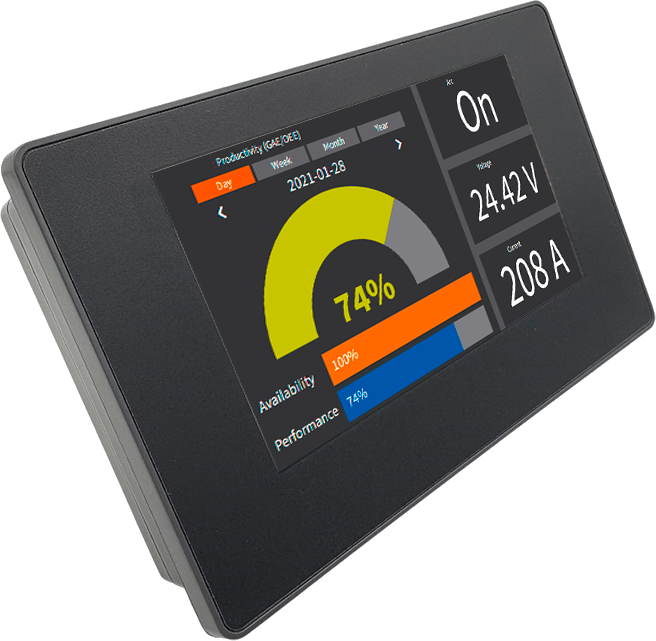
CommandHMI 4,3″

{ Para constructores de máquinas, integradores, estudiantes, aficionados, etc. }

IHM Toolbox — Function Graphics
🔘
Bit Switch
Bit Switch
Memory bit toggle button. Switches a register between 0 and 1 on touch action.
COIL
🔤
Word Switch
Word Switch
Writes a defined word value into a memory register when pressed.
REGISTER
📱
Screen Button
Screen Button
Navigation button between application HMI screens or pages.
NAV
💡
Bit Lamp
Bit Lamp
Binary status indicator. Changes appearance according to a memory bit value ON or OFF.
STATUS
🔆
MultiState Lamp
MultiState Lamp
Multi state indicator. Displays different appearances based on register value.
STATUS
🎛️
MultiState Switch
MultiState Switch
Cyclic multi state switch. Each press increments the associated register value.
CONTROL
🔢
Num. Display
Numeric Display
Displays the numeric value of a register in real time. Supports integers and decimals.
READ-ONLY
✏️
Num. Input
Numerical Input
Numeric input field. Opens a numeric keypad to write a value into a register.
READ/WRITE
⚡
Function Button
Function Button
Multi function button combining several actions into a single press.
MULTI-ACTION
📝
ASCII Display
ASCII Display
Displays an ASCII character string stored in consecutive registers.
STRING
⌨️
ASCII Entry
ASCII Entry
Alphanumeric input field. Stores text into memory registers.
STRING
🔲
Multi-function Button
Advanced button combining status display and multiple configurable actions.
ADVANCED
🕐
Time Display
Time Display
Displays system time in real time using the selected format HH:MM:SS.
SYSTEM CLOCK
📅
Date Display
Date Display
Displays the current system date according to configured regional format.
SYSTEM CLOCK
📆
Week Display
Week Display
Displays the current day of the week.
SYSTEM CLOCK
🖼️
Static Picture
Static Picture
Fixed image embedded in the interface. Used to illustrate areas or equipment.
STATIC
🎨
Picture Display
Picture Display
Displays different images based on register value. State visualization using images.
DYNAMIC
📈
Trend Chart
Trend Chart
Real time trend chart. Plots the evolution of one or more variables over time.
REALTIME
📉
XYTrend Chart
XYTrend Chart
XY chart or scatter plot. Compares two quantities against each other.
XY PLOT
🗂️
Historic Trend
Historic Trend
Displays historically recorded data with time navigation.
HISTORY
📊
Datagroup Display
Datagroup Display
Displays a structured group of data in a configurable table format.
TABLE
🚨
Alarm Display
Alarm Display
Lists active alarms in real time with status and timestamp.
LIVE ALARM
🔔
History Alarm
History Alarm
Alarm history log. Review past events with date and time.
LOG
📢
Alarm Bar
Alarm Bar
Scrolling banner displaying active alarms continuously at the bottom of the screen.
TICKER
📋
Recipe Selector
Recipe Selector
Selects and loads a set of parameters from memory into registers.
RECIPE
📑
Recipe Data Display
Recipe Data Display
Displays the values of the active recipe in a readable table.
RECIPE
💾
Historical Data
Historical Data
Table for viewing data stored in internal memory or SD card.
ARCHIVE
📓
Operation Log
Operation Log
Log of operator actions including inputs screen changes and button presses with timestamps.
AUDIT
💬
Message Display
Message Display
Displays a predefined text message based on register value. Message library support.
TEXT
↔️
Graphics Move
Graphics Move
Moves a graphical object on screen based on register value on X or Y axis.
MOTION
🎭
Animation
Animation
Animates an object using sequential images based on register conditions.
SEQUENCE
🛤️
Path Display
Path Display
Animates an object along a predefined path. Simulates conveyors or carts.
CONVEYOR
⭕
Dynamic Circle
Dynamic Circle
Circle whose size color or position changes based on register value.
SHAPE
▬
Dynamic Rectangle
Dynamic Rectangle
Dynamic rectangle whose dimensions or color change based on process data.
SHAPE
📐
Canvas/DXF
Canvas/DXF Display
Displays an imported DXF vector file. Integrates CAD diagrams into the HMI.
CAD IMPORT
〰️
Flowing Block
Flowing Block
Animated block simulating fluid or material flow in a given direction.
FLOW
🔗
Pipeline
Pipeline
Graphical representation of pipes with animated flow.
PIPE
↩️
Corner Flow Block
Corner Flow Block
Corner block for animated flows. Enables turns in piping circuits.
PIPE ELBOW
🥧
Pie Show
Pie Show
Pie chart displaying relative proportions of multiple values.
CHART
🌓
Arc Chart
Arc Chart
Arc gauge visualizing a percentage or value within a defined range.
GAUGE
📊
Bar Graph
Bar Graph
Vertical or horizontal bar chart for comparing multiple values.
CHART
⏱️
Meter
Meter
Analog gauge similar to voltmeter or ammeter. Needle position reflects register value.
ANALOG
🎚️
Dial
Dial
Rotary input control. Operator turns the knob to set a value.
INPUT
📋
ComboBox
ComboBox
Dropdown selection list. Each option corresponds to an integer value in a register.
DROPDOWN
📌
Message Board/G code
Message Board / G-code
Display table for messages or G-code programs for CNC machines.
CNC / TEXT
⬆️
Stepping Button
Stepping Button
Increment or decrement button with defined step. Gradually modifies a register value.
INCREMENT
🔵
Single Button
Single Button
Simple single action button. Triggers one predefined event.
BASIC
⬛
QR Code
QR Code
Generates a dynamic QR code from register data. Can be scanned from a mobile device.
2D BARCODE
⏰
Timer
Timer
Configurable timer. Counts up or down and triggers actions.
TIMER
⌨️
Keyboard
Keyboard
On screen virtual keyboard for alphanumeric input.
INPUT
🪟
Multi-window
Multi-window
Popup window or sub screen overlaid on the main screen. Multi layer navigation.
POPUP
↕️
ScrollBar
ScrollBar
Interactive scrollbar. Controls a register value by sliding.
SLIDER
🎛️
Slider
Slider
Sliding cursor for entering an analog value within a defined range.
ANALOG INPUT
🔀
Determinant List
Determinant List
Conditional list whose elements are determined by register conditions.
CONDITIONAL